The InVideo alternative that posts to your TikTok
InVideo leaves you the video to upload yourself. Bandi creates it with AI and posts it to your TikTok. Start free.
Start for free →
✓ No credit card required•✓ Up to 6 free videos




Why Bandi?
What changes if you come from InVideo: it posts itself, and you pay month to month.
Three differences, checked on InVideo's website on September 25, 2026.

01
Start free, pay monthly
InVideo only has annual plans, and its free account exports videos with its logo. With Bandi you start free with no watermark and, if you pay, it's month to month with no lock-in.
02
It posts to TikTok for you
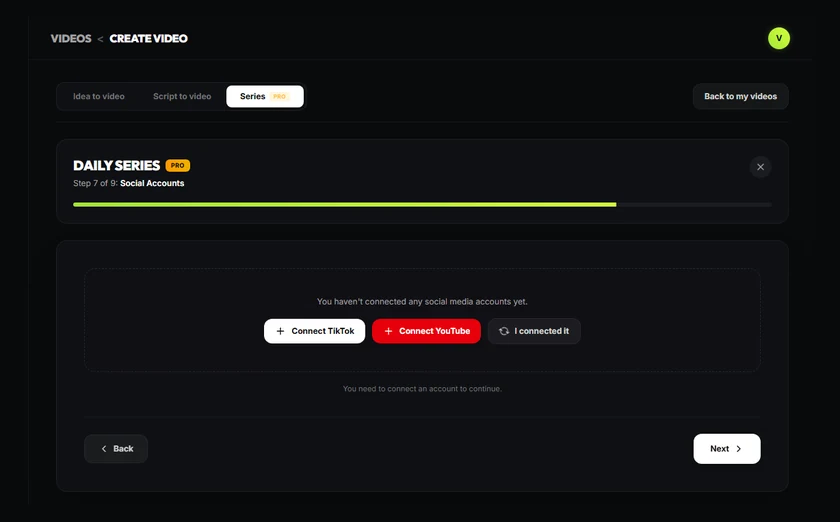
InVideo exports the video and you upload it. With Bandi you connect your TikTok through the official integration and it posts for you, on every plan, including the free one.
03
Series that post themselves

Pick a topic and Bandi creates and posts a new video every day, at the time you choose. From the Creator plan ($35/month). InVideo doesn't advertise anything similar.
Bandi vs InVideo
 Bandi. Bandi. | InVideo | |
|---|---|---|
| Free plan | Yes: 3 credits to start, no card and no watermark | Its pricing page shows no free plan; the free account exports with its logo |
| Cheapest paid plan | Lite · $17.99/month · 20 1-min videos or 40 30-s videos | From $20/month on its English site ($9 on its Spanish one), billed annually only |
| Posts to TikTok for you | Yes, on every plan, including the free one | No: you export the video and upload it yourself |
| Series that post themselves | Yes, from the Creator plan ($35/month) | Not advertised |
| Languages | Spanish and English (website and voices) | Spanish website; voices with different accents |
Free plan
Bandi: Yes: 3 credits to start, no card and no watermark
InVideo: Its pricing page shows no free plan; the free account exports with its logo
Cheapest paid plan
Bandi: Lite · $17.99/month · 20 1-min videos or 40 30-s videos
InVideo: From $20/month on its English site ($9 on its Spanish one), billed annually only
Posts to TikTok for you
Bandi: Yes, on every plan, including the free one
InVideo: No: you export the video and upload it yourself
Series that post themselves
Bandi: Yes, from the Creator plan ($35/month)
InVideo: Not advertised
Languages
Bandi: Spanish and English (website and voices)
InVideo: Spanish website; voices with different accents
InVideo data checked on invideo.io/pricing on September 25, 2026. Bandi prices are the ones for your country.
When InVideo may suit you better
To be fair, this is where it may suit you better:
01
If you need advanced generative video
InVideo uses models like Seedance. Bandi animates scenes with AI, from 1 credit per scene.
02
If you want deep timeline editing
InVideo has a full editor; Bandi makes the video for you and you tweak it scene by scene.
03
If you want an all-purpose video platform
InVideo covers many kinds of video; Bandi focuses on short videos for social media.
How it works
Get started in 3 steps
1
Write your idea
A topic, an idea or your own script. That's all it takes.
2
Bandi makes the video
Script, voice, images, captions and music, edited vertically and ready to post.



3
Post it to your TikTok
Connect your account through the official integration and Bandi posts it for you. Or download it if you prefer.
FAQ
No: according to its own website, you export the video and upload it yourself. Bandi connects your TikTok account through the official integration and posts for you, and you can start with 3 free credits.